29 July 2010

No video for you

According with the latest thread of doom from the devel list, despite the expectation set in May when WebM was released, we won't have Firefox 4 in Fedora 14, so effectively no out-of-the-box support for web video, nor the other goodies coming in this release (how fast you can say "faster JavaScript"?)

At times like this I am happy I am not a (full) Ambassador, after GNOME 3.0 was postponed for more 6 months (don't get me wrong, I am happy my desktop will remain usable one more release cycle), from a desktop user point of view our feature list is very thin so at the release I won't have to look end-users in the eyes and say "sorry, we don't have anything for you". No wonder they perceive Fedora as a distro focused on "obscure server stuff" and defect to other distros, which do have desktop features and advertise them.

As for myself, I can't endure 6 more months without working web video support so I have two options: jump to Epiphany, something I try from time to time and return back since I find Epiphany a sub-par browser, or simply install a current Firefox from a 3-rd party and forget about dependencies and updates. Currently running without problems Firefox 4 Beta 2 from Remi on Fedora 13 (the only problem is it is installed in addition not instead of the old Firefox 3.6)

youtube webm

In the words of the release Nazi: no web video for you! Come back, 6 months! Next!

16 July 2010

openSUSE 11.3

Yesterday our friends from the Romanian openSUSE community launched their new 11.3 version with a party in Bucharest (they also have today a more formal event in the city of Alba Iulia, but that is too far). Of course we were invited... bad mistake since they were easy to be outnumbered and guys like me and Adrian used the opportunity to wear our Fedora T-shirts.

opensuse 11.3 opensuse 11.3

Overall it was a nice event with cool people, good talks (unfortunately for them I think we talked more about Fedora than openSUSE), fun time and cold beers.
opensuse 11.3

Still, I am not sure I will get invited a second time: in addition of wearing that T-shirt, yesterday was the day I brought from office to home my newly purchased airsoft toy and had it with me to the amusement of the audience, who couldn't stop playing with it:
opensuse 11.3

I also had my funny and noise making stuffed hand, which also was a real attraction:
opensuse 11.3

And of course I couldn't miss my laptop holding a copy of the wet Fedora T-shirt photo session (can someone enlighten me why the girls seems to like those photos even more than the guys? not that the guys don't like them, by the opposite!):
opensuse 11.3

So what can I say more? I like the event and hope will be invited to the next one too (I promise will not bring the same toys again).
opensuse 11.3

Photos from the event are available in our (Romanian Fedora community) gallery.

PS: For reference here is how we party at Fedora (a couple of months ago for F13) - beer at the wheel, this is a large round plate in the form of a caravan wheel, holding 11 glasses of beer at the price of 10:
fedora 13

14 July 2010

Cantarell

As Ian and Ryan already blogged, the Fedora Design Team is evaluating new branding fonts: Comfortaa for headings and either Cantarell or Droid Sans for body text.

Part of this test is language coverage, so I tried the weak point I know in support for Romanian language, the letters ș and ț (very few fonts support them, even for Liberation it took years to get them) and not to my surprise, both Comfortaa and Cantarell failed. Knowing from the Open Font Library what a great guy Dave Crossland, the Cantarell's author, is, I wrote to him, telling about those missing glyphs.

He not only replied fast, with a promise to improve the fonts and a preview of the patch (the 'regular' version of the font), he also gave me extensive advice about font editing (I expressed my lack of confidence in my font editing and hinting knowledge), including a screenshot, so I think I will share the knowledge:

cantarell
FontForge screenshot by Dave Crossland

What I did was to open the kcommaaccent glyph (U+0137) and drag a guide down to -122 and copy the comma glyph shape. Then open the combining glyph U+0326 and paste it in, making it center-aligned on the origin (so the metrics are both -169). Then select the 4 accent glyphs you list, and at the element menu, Build, Build accented glyph.

...and make sure they are vertically aligned with the guide I just made, and "by eye" check they are horizontally aligned with the bulk of the black of the letter. See screenshot attached."

Thanks Dave, you are awesome! - that's an "upstream" pleasant to work with.

08 July 2010

GIMP 2.7.x

Thanks to Luya (and the people who helped him in turn) there is a GIMP 2.7.x package (the development trunk, leading to the much awaited 2.8) available in koji, I was busy these days and almost forgot about it but the GIMP scammer this morning reminded me about it, so I had the opportunity to play:

gimp 2.7.1

For starters I tried the single-window mode, which everyone seems to anticipate so badly and forced myself to use it for a while: I am not sure I will end using it as default, I feel it wasted some screen estate, probably is not usable on the netbook. There are also some smaller interface changes you have to accommodate with, like the move from Save to Export dialog of a lot of file formats, zoom shortcuts and more.

Scammers

We all know those scammers who take FLOSS software, change the name and try to make a buck from naive users, I saw this so many times with OpenOffice.org, GIMP, Inkscape, Audacity and so on. So no surprise seeing one of those renaming GIMP as PhotoEditorX, hyping is as "Award-Winning Photo Editing Software Previously Only Available For Professional Studios" or "Dead-Simple To Get Started & Great For Beginners & Professionals Alike" (GIMP detractors - that is in your face!) and selling it as the incredible discount of 47$ (down from $297)

scam

Nothing out of usual so far until the step where a kind soul noticed the scammer is using one of my videos to advertise his product (a small demo for the Resynthesizer smart-removal plugin. I am not very sure if I should be angry about such usage (at least I have a title in the video saying "GIMP") or feel flattered by my video being called "a must see!". Anyway, the video is Free, licensed as CC-BY-SA, so the only thing I could do is to try to get satisfaction on the BY (attribution) and SA (share alike) parts (like a scammer would care!). Or try to shame him on my blog... oh, I just did that :D
scam

So a moral for this story? That's what the guy has to say about GIMP "If You Think PhotoShop Is Good, You Ain't See Nothing Yet..." Ignore the hype, have a look at my Free graphics tutorials and you will understand applications like GIMP and Inkscape are really useful, with the potential to make your life better. Just don't give money to scammers.

05 July 2010

3G woes: maybe NetworkManager isn't that bad?

I curse NetworkManager a lot, these days my main internet connection at home is 3G, using a Huawei E160 modem, an Orange 3G subscription, Fedora 13 and an EeePC (a match made in heaven, yeah, right) and the combination works painfully bad, not sure why, due to the service provider, the cheap modem or NetworkManager but from what I remember it works worse than used to in Fedora 12, which made me sometime think about downgrading (or jumping to F14 as soon as the Alpha appears, but that would mean inflicting GNOME 3 earlier... uh, no good solution on the horizon).

Well... it looks like my cursing should slow down after I had to deal at work with a much worse situation: Windows 7 on a Sony Vaio netbook, the same Huawei E160 on Orange and a Huawei E220 on Vodafone. Have a peek:

3g
Windows monstrosity

I won't talk here about the awful user interfaces (supplied by the carriers and you must use them) which make your eyes hurt, brain explode and usability die (compared with them NetworkManager is a breeze). My problem here is with making them both work together on the same computer, which on Linux is natural: you add the connections in NM (with a wizard) and just select whatever you want from a menu.
3g
Linux: nice, clean and both working simultaneously

My task here was investigating the quality of the Vodafone solution, try the Orange one and evaluate which is better, so the computer already had installed Vodafone Mobile Connect and the E220 drivers. In this situation Orange Internet Everywhere (you must love those names!) refuses to install itself, it supposedly installs (automatically) some drivers and then reports and this is all, it says then you already have the the latest version. Installing the application manually, it doesn't see any connection. The two apps just refuse to stay installed both at the same time and uninstalling is not easy either (last time when I had to remove the Vodafone app and make the Orange one work I had to do a system rollback to get rid of everything).

Needless to say, the modems are carrier locked (you can't buy unlocked ones) so you can't switch SIM cards and no apps work with the SIM from the other carrier. And no independent application is available from the hardware manufacturer (Huawei). And putting Linux on that netbook is not an option either.

I said you already how much I hate 3G?

04 July 2010

Good hackergotchis for everyone

A good Planet blog aggregator, like our Planet Fedora is defined by its great content, and I am one of those who strongly believes great content is not only dry info about our work and press releases, but also personal things about the people lives: data about our pets, year long running self-portraits, game tips, movie reviews, mosaic covered drawings and so on (I may not be 100% on the same page with the board here, but I am a known felon). But the content by itself is just content and is provided by a large and distributed team, we at the Design Team can't, and should not try to influence it, what we can do is to improve the presentation.

Presentation-wise, we have a nice template that fits the look and feel of Fedora and we have those little graphics named "hackergotchi" which are ...not perfect. So that's the purpose of this article: talk about them, give a few hints about how they can be improved and show some examples.

A dry definition from Wikipedia sounds like this: "A hackergotchi is a picture of a writer used as an avatar to identify the author of a given web feed in blog aggregators" and also according to Wikipedia they were somewhat invented by Jimmac (BTW, I am still speechless in awe by the news about him joining Red Hat maybe is still hope for GNOME 3 to not become a turd?). In practice they are disembodied hacker heads floating next to one's blog post, to help identify and make a personal connection with the author.

Years ago I tried to improve their state and did what I was able to do: created a default icon for those who do not have an image, wrote a small tutorial about creating your own hackergotchi and created a wiki page where those who can to it themselves can place a request. I advertised those on Planet, but failed to do the next step: proactively contact people with bad, poor or unsuitable hackergotchis and inform them about their options. I suck.

Now I passed the hackergotchi maintenance torch to Pierros who, as a junior member of the Design Team needed an entry task so I can pretend to have an eldery status and make judgements on quality and pass advices. And be self pretentious.

From a technical point of view a hackergotchi is a small PNG image with transparent background, so it can work regardless of the page background, usually depicting the head of the person with no background and having a drop-shadow to make it stand-out better in the page. Historically I used to make them 96x96 pixels, people who did themselves used whatever sizes they thought of but recently Pierros proposed, and we agreed, to move to a new standard size, 120x120, which should be small enough to not alter the layout but large enough to give a better image, so you can actually recognize the person when meeting face to face. Also, when cutting your face on the contour, leave out your neck or body.

From an artistic/photographic point of view you need a good photo: as the image is supposed to represent you, it must show your personality, so don't use photos like they are used for your passport/id card/driver license, use something to show your soul. Try to take the photo with a good camera, using the crappy one made with your cell phone may be usable if you have the perfect light, get a lucky angle and the stars are aligned, but most of the time not even the most experienced GIMP wizard will have a hard time with it and the result will not be great. When taking the photo is a good idea to use a plain, seamless background so the work is easier and if your hair is curly, fluffy or long to have it hung together (you know how hard is to cut the hair's contour?).

If I scared you with the instructions above, here is the sugar-coating: we have a service where the Design Team will do the work for you if you provide an image! Go to our ticketing system and put a new request, select "hackergotchi request" as the type at the top of the ticket and attach or link to a photo (please, see above what is a good photo).

At the latest IRC meeting, when I was tasked with this article we considered a good addition would be a list of examples of good hackergotchis, but as the creator of many of those images I wanted to avoid bias, so Mo helped me with a list with what she consider good samples (I don't necessarily agree with her selection), which I will try to comment and highlight the strong points, so here we go:

hackergotchi for this one I do like the shooting angle, is good and it made the cutting work easier and I like his smile, however, I don't like his eyes being so closed, I don't believe this is his personality (IIRC, it was a beach photo and the sun was "guilty" for that).

hackergotchi this one is great and it was made by the user himself: the photo is very sharp, made probably with a good camera, the smile is telling a lot and the hat used to tell its part of the story.

hackergotchi warm smile, good angle = good hackergotchi

hackergotchi here you can see the result of using a good camera, however not knowing him in person can't say how representative the smile is. I acknowledge my GIMP'ing mistake, should have cleared a bit more below the ear.

hackergotchi very sharp image, easy to work with and a huge smile, showing a person you would want to work with too.

hackergotchi good original angle, good GIMP work for cutting, it could have used a bit more sharpening

hackergotchi this one also suffers IMO from the lack of sharpness, maybe GIMP can help, otherwise is great: the angle, the posture, the diffused light.

hackergotchi another warm smile, another hackergotchi made "by the book".

hackergotchi this one is close to perfection: good photography (sharpness, light), good posture, big smile. Only a few pixels at the chin could have been softer (why do you think we use drop shadows? to make those pixels less visible!)

hackergotchi I would have not included this one as a "good" example: it to flat, the camera used was not great (look at the hair) and the background is white, not transparent. But he has a good smile, which makes a lot.

hackergotchi great one, the angle tells a whole story, that's someone you don't want to miss with.

hackergotchi if you know Pierros, you know his smile. Still, I had a lot of troubles with this, his black hair is held with a black band and it was really hard when GIMP'ing to understand which is which.

A closing conclusion? Yeah, is the time, I feel like I already bored everyone: rules? yes, they are usually good, but when you have a vision, forget about them, go crazy and show the real you. And take all I said with a grain of salt, after all I am the one using currently as hackergotchi the drawing below:
hackergotchi

Update: Jef just provided a template small howto for adding badges to your hackergotchi, adding the link as it is an useful reference.

02 July 2010

Is my sunglasses curse broken?

Let me take you a couple of years back in time, when the Romanian Fedora community was young and we were set to take over the world. GSLM invited us to keep some presentation in the city of Cluj Napoca at the Babes - Bolyai University and full of enthusiasm we went with a large team (me, Adrian, Alex, Andrei and Andrei). I was wearing a nice pair of new sunglasses, which were not cheap at all and being new and me not really used with them, I obviously lost them somewhere, most likely forgot on the table where we went for the beer after. And so is how my sunglasses curse began. Or at least how I became aware of it.

Sure, at the time I was not aware it is a curse, so I bought a new pair, but this time a cheaper one, but still nice. Which of course didn't last much... I lost it 3 months later on the bus going to the Brno FUDCon, so I became once again glassesless. And then I said to myself: "hmmm... this is like a curse, maybe I am supposed to not wear any sunglasses". And life went forward...

Well... do you think I can learn a lesson? Of course not... next spring when the sun started to shine again I did it again and bought yet another pair. And it lasted until... yes! you guessed right... until the Berlin FUDCon, I realised I don't have them as soon as I got out of the plane at the return in Bucharest. And then I knew there is a curse and I am not supposed to buy other sunglasses.

And you are surely right if you guesses I didn't learn enough from that! Next year, another spring, sun shining again and be buying new sunglasses, this time an "outdoor" model, supposed to be resistant. Soon after that, when doing a second photo session with the model famous from my Fedora T-shirt pictorial I put the sunglasses in the pocket to not lose them again and broke them! The curse at work, of course... but for the time being I avoided it using some superglue.

A few weeks later, after work I was going to a place where I do some design extra-work (this is the first event in the story which is not Fedora related - I just use Fedora do to design for something which will work also on Linux). Got out of the subway and was surprised by a really heavy rain. Ran a little but to get cover under the nearby umbrellas where I did wait a few minutes for the rain to slow down so I can go forward. The rain stopped and I started to walk when I noticed the sunglasses which where hanging to the collar of my T-shirt are missing. Oh! the curse again! probably that was the sound when I was running in the rain...

Hopeless, I tracked back my steps, looking down, maybe I see the glasses and they are not completely damaged. It was looking like no luck for me when I heard someone shouting for me: the sellers at a street fast-food store (a shawarma place) were calling me: they say me dropping the glasses, picked them and now retuning them to me. Thanks a lot guys! Now I wonder if the curse is broken at last...

Anyway, if you are hungry and near the Brâncoveanu subway station, here is the fast-food place, this those nice people that fully deserve this shameless advertising, if their foos tastes half as good as their gesture you are set (bad photo taken with my infamous cell phone, it still rained so I kept the camera in my backpack):

[brancoveanu]


Advised by a colleague, a couple of days ago I bought a string so the glasses will hang on my neck and the curse may not manifest itself again but... I think I will have to wait until the Zurich FUDCon before declaring it dead or alive.

28 June 2010

Dead man's switch

A dead man's switch is, in Wikipedia's words, "is a switch that is automatically operated in case the human operator becomes incapacitated" and beside being a simple but cool project to work on, it may prove useful if you for example got threatened - your friends may notice you disappeared from the face of the internet, but will not be sure what is it about and won't know which actions to take.

So here is how I coded my own using some very simple Bash and php scripts (precise details are left out to diminish the possibility of an attack): there is a cron job running at a predefined interval, every N days. IT checks for an existence of a file, if the file exists, it is deleted and I am sent a reminder to update my status. If the file does not exists, then it assumes I was incapacitated and unable to update my status in the last N days, so it releases the payload, publishing some important content on the web.

The reminder directs me to a web page where the viewer is asked for a secret password, if the correct password is entered the status is updated, the check file restored. Every operation there is logged.

For security reasons, the software does not run on any of my computers or, if that matters, on any computer in my country, so it can't be reached by any person who has physical contact with me.

The code is trivial and sloppy, with sensitive info inside, so it is not worth or sane to publish the sources, but I am sure any of my readers can reimplement it in a matter of minutes, a couple of hours at most, reading the design specifications above.

Note: if you wonder, I did not got threatened by anyone in the FLOSS world or software world nor I feel in any immediate danger, is mostly a geeky exercise.

27 June 2010

Fedora support

These days a big metal festival is taking place in the city (which unfortunately, for various reasons I didn't attend) so many people are visiting Bucharest, this was a good opportunity opportunity to get out with a couple of friends for some beers. At the pub we were joined by another guy, one of their friends, also visiting the city for the festival and when he saw me wearing the Fedora "splatter" T-shirt he was shocked and asked me why, was that the only T-shirt I had available, I grabbed something randomly or what?

I replied saying I am a Fedora contributor and inquired about his reaction: apparently he hates Fedora in particular and Linux in general (Fedora is his only Linux experience) for being forced to use it at work, for some VoIP software: he has troubles installing apps, wasn't able to install multimedia playback (MPEG codecs) and had read on some forum PulseAudio is crap. I tried to explain the part about users and program installation is good from a sysadmin point of view, explained PulseAudio may be troublesome if you use other crappy distros or playing with advanced stuff like Jack, which is not his case, and introduced Rpmfusion.

Conclusion? He now has my IM address (from the Fedora official business card) and hopefully will call me for precise answers (more than in front of beers). And I can't resist the coincidence with the festival: Rock it!

note: for those not aware, the Fedora 13 slogan is "Rock it!"

Dissension

On one hand I am somewhat disappointed to see how little reaction is caused when a rockstar from our community like tatica get out and shout her frustration with politics in Fedora LATAM and not only but on the other I am not, knowing how she was driven out of Planet mostly by the same people and now is posting half-anonymously under the "Fedora Venezuela" label.

Back to the topic (yeah, is week-end and everything goes slower, including for me) I know communities are very complex: there are people who I consider the closest ting you call a friend and there are people I despise with all my guts, there are people I have deep respect for and there are people for whom I wont waste 10 seconds of my life learning more about, there are people from whom you can learn a lot and some not so much (and I am sure there are people including me in some of those categories). And just as people, there are happenings that make you feel your day is worthy and happenings that make you want to go away.

Frustration from people and happenings will build and from time to time you see people passing a threshold and reaction: some go in troll-mode and flame everyone and everything, some vent-off with a bang on a list or aggregator, some lose interest and scale back their contributions, some go away silently, some swallow-up and try to continue, some take a long pause, some do a combination of the above. I wonder, when I will pass the threshold (is not a question of "if" but one of "when"), what will be my reaction?

17 June 2010

FAIL

A couple of my friends:

fail

PS: if you are wondering, that's the wet T-shirt dried

14 June 2010

Will you take a picture with me?

This week-end I had another photo session with my wet Fedora T-shirt one of my models and after the shooting we were enjoying some nice cold drinks after one of the most torrid days so far in this summer (we had ~37°C in Bucharest). Me and her manager were wearing Fedora T-shirts (I got them sold in the community idea, not in the software yet) and much to our amusement a random guy approached us: "please, you you want to take a photo with me?". Intrigued, we accepted.

fedora

Then the story unfolded: he knows a woman named "Fedorca", which is an unusual name and everybody in their circle of friends makes fun of her name. So he got the idea to take a photo with us, wearing Fedora T-shirts, then edit the photos and add a "C", then have even more laughs.

Bizzare.

09 June 2010

Sad panda, happy panda

This wek-end, when shooting cars & stuff (there was a drift competition in the parking lot of a mall) I stumbled upon those toys and decided I must have a piece too, as Pandas are kind of a sacred animal in Fedora-land, so they are sitting now right next to my computer.

pandas

PS: no plastic toy was hurt during this shooting, all the possible perceived sadness is due to GIMP alterations.

06 June 2010

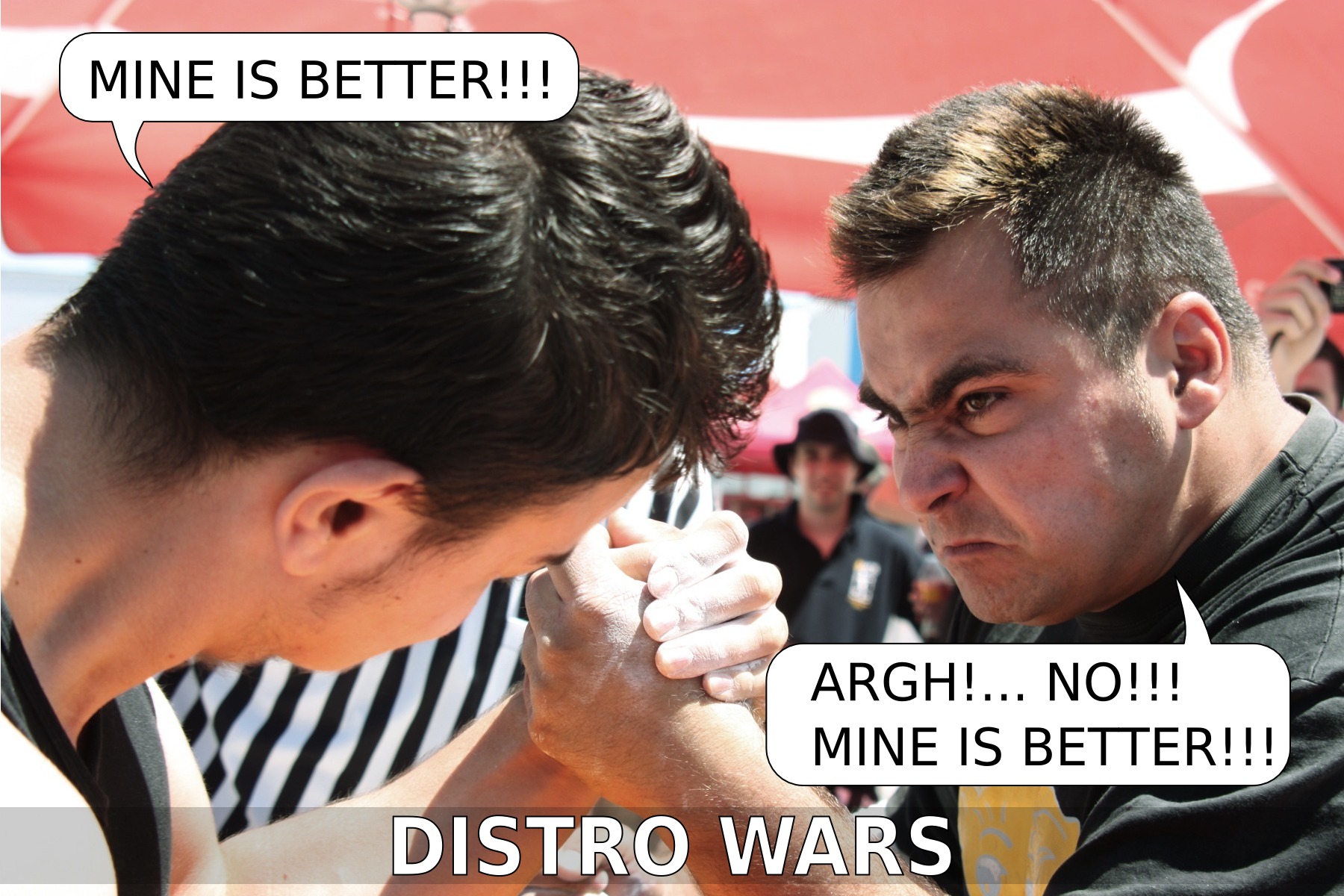
Distro wars

Another week-end spent out, shooting people... I liked the expression on the face of this arm wrester so much, that I couldn't resist messing with it in Inkscape. Enjoy a bit of Sunday fun:

distro wars

PS: of course, after the competition they shook hands and maybe had a beer together.

02 June 2010

Big LGM photo dump

I thought I spammed the Planet enough, but I see everybody started linking theirs LGM photos, so I had to dump mine too in a gallery somewhere, so there is the bulk of my LGM photos (the most important are already on the blog, albeit at a small resolution).

In other Fedora photography related news, I have some more of those, but they are not to be posted on Planet, so if you know what is about, you know where to look for.

01 June 2010

Video: Fedora Design Team at LGM 2010

Until the official video is up, you can see a recording of our talk about the Fedora Design Team made with my pocket video camera (so low quality).

fedora design @ LGM


Slides are also available as PDF and if you want to reuse them under CC-BY-SA, just change the extension to .odp and will get the source.

PS: thanks to Martin for being the better half of the presenting duo and to Tatica for adding the final polish to the slides.

PPS: if you have problems playing hte video, you can change the format to Theora and download the original.

Preemptive

There are some rumours about Pierros preparing to blog a set of compromising photos made around LGM and supposedly featuring me in some embarrassing postures... I can only say bring it on!, I am a notorious troll and nothing posted in the interweb can make me feel ashamed further, not even the bunny years, let the Planets ROTFL on me. And he is having second thoughts, here is some ignition fire. Pay back and embarrass me, it's your turn:

pierros

LGM 2010, Postmortem

The Libre Graphics Meeting 2010 ended, today I returned home in the ugly but familiar city of Bucharest, grabbed myself a bag of nice strawberries and reserved some time to blog my conference conclusions. I'll do this using a few photos and useless ramblings.

First, I should acknowledge we officially proclaimed the secret Fedora lair in Brussels - no photos of it, since if I will tell you the location, I will have to kill you. All I can say, it is into walking distance (5 minutes) of the "Japanimantion" store and (10-15 minutes) of Delirium Cafe. Those wanting to know the exact location, have to perform the secret Fedora gangsta sign (hint: is not the "horns" sign, neither the "telephone" sign).

As I said, the place is awesome, it has a good price, good service, free Wi-Fi, a huge kitchen, breakfast included and so... it also has a shelf full of books... unfortunately most of them in French. I tried to use my bad French to read from one of them and my bad English to translate for the guys, but it was a massive FAIL, the got only the general idea.

lgm

As I said, I found nearby my new favorite place in Brussels, who dethroned Delirium Cafe from the top spot. And a few friends of mine are already craving for stuff from there and asking for my next trip:
lgm

It was also a perfect opportunity to reveal the homeless people of Fedora (how would you call other the guys eating fries from paper recipients on the stairs of a church?)
lgm

Speaking of Fedora, the truth is our talk was totally ruined by Hong Phuc Dang, who talked just after us and charmed the entire audience. Nothing could have surpassed her talk, probably not even Adobe opensourcing Photoshop and making it Linux-only:
lgm

LGM was also an opportunity to meet people, like the Argentinian Blender guy, with whom we discovered common friends:
lgm

Other interesting random encounters were with the guy from Morocco, who couldn't believe my blog is not written by a woman (!!!) and the Italian guy who talks almost perfectly Romanian:
lgm

From the backstage, I can show a "making of" photo of the group photo - yup, it was taken from the above;
lgm

My single complaint at LGM was the food: my stomach agreed with someone else I talked there, that green stuff was not food;
lgm

Surely, we were not perfect, I think our biggest failure was the inability to participate to the Fedora 13 release party in Belgium, which happened during the LGM, but in a different city, so we couldn't go there and back to Brussels, it was a missed opportunity (on the other hand, I was disappointed nobody from the local Fedora community attended LGM - I wrote on the Ambassadors list and blogged about it, hoping to raise interest).

In the end, I have to get serious and thank Red Hat. Fedora and Max for making the presence of the Desktop Team a reality, without this help it wouldn't happen.

31 May 2010

Another one for the team

If the first one was about mere strawberries, the second dedication for the Fedora Design Team members absent from the Libre Graphics Meeting 2010 is more elaborate: Belgian gaufres, with strawberries, chocolate and whipped cream. And this time we definitely eat them for the team:

gaufres

LGM 2010, Last Day

The last day of any conference is lighter on content, so that was also the case with Libre Graphics Meeting, but it still had a couple of presentations (albeit, they were not very technical):

lgm

And a panel discussion:
lgm

And plenties of "thank you" for everybody: participants, speakers, sponsors, crew, etc. (now is my turn to say thanks to Femke and the rest of the team):
lgm

And we had a last lunch with the leftover from the previous days (real food, here I come!)
lgm

And the conference ended formally with a planning session for the next year:
lgm

But of course we said goodbyes, took photos, daid goodbies, shaked hands, said goodbyes, sometime hugged, said goodbyes:
lgm

and said goodbyes again for maybe the million time:
lgm

And if that was not enough, got in the city for the evening with a new round of goodbyes:
lgm