31 August 2010

Mission/Vision

Last week being out for a photography camp (don't ask for the photos, I don't have any ready to show yet and then will have to wait more for signed release forms) I missed a good part of the talks (mega-flames?) about the Fedora vision and mission, happening on the advisory board, respectively development lists. Only now I start having a little time to get a glimpse of it and maybe making my point in the process.

People that know me pare probably aware I like to quote a lot an old but famous piece by jwz about software development and its purpose, here's an excerpt:

"How will this software get my users laid" should be on the minds of anyone writing social software (and these days, almost all software is social software).

"Social software" is about making it easy for people to do other things that make them happy: meeting, communicating, and hooking up.
I agree it is true about any type of software, not only "social" and to be clear, is not literary about helping people having intercourse but in a larger sense making their lives better.

So I should obviously ask myself if and how using Fedora is impacting my life, here are a few examples:
  • one piece of software that changed my life in the past years is Inkscape (I practically re-started doing graphics thanks to it) with the new released 0.48 version, for which we have packages in Koji for F14 and up. Even if it is a mostly bug-fix release, I am obviously anxious to run it but the only possibility for doing so it to jump my desktop to a pre-Alpha F14 and endure a world of pain. I miss the older, better times when the maintainer could be persuaded in pushing such things to Stable.
  • as any desktop user I use the web browser a lot and my choice is Firefox here. The new and exciting new release is Firefox 4, currently in Beta 4 and targeted to a final release around the same time with Fedora 14. Unfortunately, we won't have it in F14, so I am using builds from an external repo (thanks Remi!) and endure the pain (for example session restore always brings the wrong version). I miss the older, better times when we used to track in Rawhide the development of applications with major user impact.
  • the Instant Messenging client is practically broken for months for me, being unable to exchange files over the Y!M network with models and photographers really worsened the quality of my life. Even while typing this very paragraph I had to (awful coincidence!) decline receiving a photo from one of my nude models.
  • as a photographer I use GIMP a lot and when I found a package for the development version in Koji (thanks Luya!) I jumped at it. Still, it is an early development version, probably F15 material (in older, better times the maintainer could have been persuaded into releasing it as as update for F14) with many annoyances. I continue to endure it on the desktop but I had to downgrade to the stable 2.6.x on the laptop when I had to give a GIMP workshop. 2.7.1 is early, but a future development release could be better, I am still pondering on this one.
So drawing a line, is my life better? It does not look so... I miss some older, better times.

PS: can you believe being at a nude photography camp I managed to give a couple of my Fedora business card and struck a few conversations about what Fedora is and why someone should/should not use it with a few fellow photographers? Talking about GIMP there was natural and I found other people using it.

22 August 2010

Workshops

Somehow I managed to put myself together and do my job, a couple of FLOSS graphics workshops, and not suck completely at it... it probably helped the audience was small, 6-7 people at each.

The first one was Friday evening at Ceata and I fulfilled an old-time request, teaching people to make their own hackergotchi with GIMP... pretty much basic introductory things but supposedly to be fun and show various tools. Still... it seems I managed to bore part of them. Maybe the beer & pizza after was too tempting? Or maybe the late hour...

Saturday was the RLUG day and its new tradition of monthly workshops. with my turn today. The idea was to reply to questions from the audience, but as nobody asked I took the freedom to show some pretty but simple things in Inkscape, it was entertaining to see people play with it like kids and to hear "wow! I won't use Dia ever again".

Still, I have to keep myself together even better, next week is going to come with a few days off, in a photography camp for which I know some friends from the community would be full of envy.

09 August 2010

FLOSSCamp 2010

I am back home after FLOSSCamp 2010 and swamped with work, having to prepare a lot of content, photos and videos, since many communities are waiting for them (mostly the photos only). So long story short, here are the photos, enjoy them.

Now short story long, we left Bucharest as a group from 3 communities, RLUG, Ceata and Fedora:

flosscamp

Here we meet the people from SbLUG, who arrived early and settled the camp location, it was a good location.
flosscamp

After we placed the tents I disturbed the event (again) by getting out my (in)famous toys and everybody started to play with them:
flosscamp

When the light dimmed, we moved to the nearby chalet for a good dinner and fun time, with music and dance, until late in the night. Sometime over the top (funny to see geeks dancing)
flosscamp

We went to sleep around 1 am, passed a night under a heavy rain with wind, lightning and thunders (my tent resisted well) only to wake-up for one of the most beautiful forest lights I ever saw (hmmm... I guess I should send it as a supplementar wallpaper proposal:
flosscamp

After a late breakfast (so many overslept and lost that magic morning light...) we went for a little walk in the forest, eating a lot of berries (raspberries and blackberries) and playing to a creek
flosscamp flosscamp

And return just in time for a bowl of spicy community goulash (apparently the cook's speciality):
flosscamp

Once more I showed my evil side, then people tried an afternoon nap and I destroyed it taking out the toys again, I am definitely evil and probably I am going to be banned from community meetings :D
flosscamp

Later we had a few formal presentations, I did catch a couple of them: Open High School and Fii Liber and missed at least another one (can't blame me, I was busy taking photos and such).
flosscamp

After the dinner we moved around a camp fire and talked until late in the night (2 AM, IIRC, when the false alarm of another rain scared us)
flosscamp

In the morning the weather was gloomier, so we sat next to the fire more and talked about community structure with people from openSUSE România and Ubuntu România.
flosscamp

We took the obligatory group photos (unfortunately after some people left, she should have done this one day before):
flosscamp
flosscamp

While everybody was packing I had my tome to get crazy and embarrass myself (like I care!):
flosscamp

And we returned home (not before a last rounds of beers, of course)
flosscamp

See you next year!

06 August 2010

My tribes

I literally count the hours until FLOSSCamp (BTW, less than 16 hours remaining until we leave the city) where I will meet my friends from the Debian tribe, from the Ubuntu tribe, from the openSUSE tribe, from many other tribes, as well from my own (Fedora) tribe... is going to be fun, probably the biggest inter-tribal meeting so far in Romania (and all of it is community, no money, no sponsors, no commercialization, no companies, no politics).

But before going, I feel like I have to let out my mind about the tribal debate. I am sad to see how, caving to the pressure or maybe trying to show he's the bigger man, Greg backpedaled, but I am freer, I am no CEO or such, nobody cares about what I say, so I have the freedom to speak my mind. From what I see, Greg is mostly right and Mark mostly wrong and is true Canonical is mostly a marketing company, not an engineering one.

Still, if I think Mark is right on one point, and IMO he is right on one I want to acknowledge that: I agree with him about GNOME going in the wrong direction and being driven there by a group of Red Hat desktop developers that are so arrogant and full of themselves, they refuse to listen to any critics, labelling them as unneeded "stop energy". But this is not something anti-Canonical, they do it even inside the Fedora community.

But back to my original point about counting hours (now about 13 hours remaining - this post was in editing for a looooong time, with many interruptions): I am going to FLOSSCamp!.

04 August 2010

Mosaics/Collages

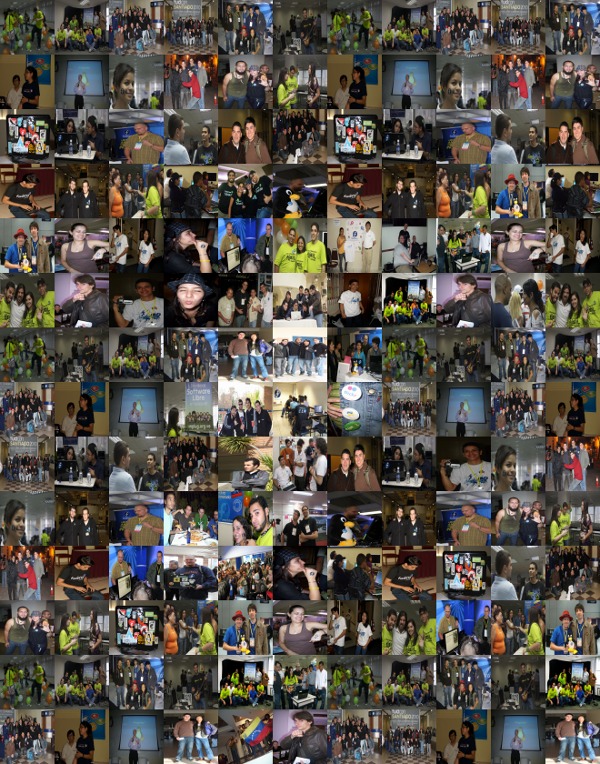
Playing today with Fedora LATAM photos provided by tatica and Metapixel, a photo mosaic generator I got those (click to enlarge):

fedora collage fedora collage fedora collage

Hmmm.... I think I am going to do more collages in the future...

03 August 2010

I am going to FLOSSCamp 2010

I can't miss FLOSSCamp, it has become a tradition and everybody will be there (all the tribes that matter). It will happen at Poiana Secuilor, near Predeal, and everybody is invited: those wanting more freedom (or a cheaper price) can stay in their tents, those wanting more comfort can stay at a chalet. Win-win.

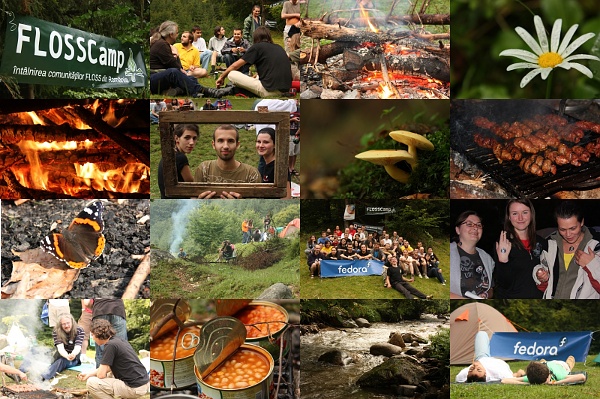
If you don't know what is a FLOSSCamp for us, here is a description: an offline meeting for FLOSS contributors from all Romania, no matter their project affiliation, where we spend a week-end in the middle of the nature, with talks, distro-wars, camp fire, beer, grilled food, fun time and so on (a flamewar is so much better face to have with a beer in hand...) See below an illustration from the last year:

flosscamp

Note: the rumour is there will be available at least a barrel with unfiltered beer..

My plan is to gather a small group, leaving together from Gara de Nord on Friday afternoon, so we are there for the first evening/night.

PS: limited time offer - there is still a free place in my (famous Fedora) tent so if anyone is interested, ping me FAST.

29 July 2010

No video for you

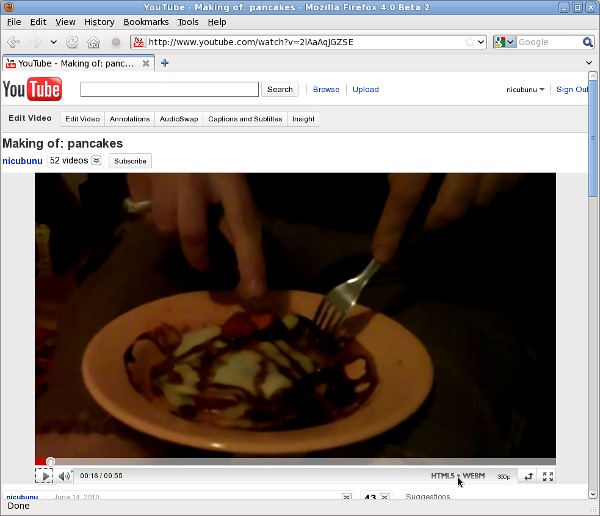
According with the latest thread of doom from the devel list, despite the expectation set in May when WebM was released, we won't have Firefox 4 in Fedora 14, so effectively no out-of-the-box support for web video, nor the other goodies coming in this release (how fast you can say "faster JavaScript"?)

At times like this I am happy I am not a (full) Ambassador, after GNOME 3.0 was postponed for more 6 months (don't get me wrong, I am happy my desktop will remain usable one more release cycle), from a desktop user point of view our feature list is very thin so at the release I won't have to look end-users in the eyes and say "sorry, we don't have anything for you". No wonder they perceive Fedora as a distro focused on "obscure server stuff" and defect to other distros, which do have desktop features and advertise them.

As for myself, I can't endure 6 more months without working web video support so I have two options: jump to Epiphany, something I try from time to time and return back since I find Epiphany a sub-par browser, or simply install a current Firefox from a 3-rd party and forget about dependencies and updates. Currently running without problems Firefox 4 Beta 2 from Remi on Fedora 13 (the only problem is it is installed in addition not instead of the old Firefox 3.6)

youtube webm

In the words of the release Nazi: no web video for you! Come back, 6 months! Next!

16 July 2010

openSUSE 11.3

Yesterday our friends from the Romanian openSUSE community launched their new 11.3 version with a party in Bucharest (they also have today a more formal event in the city of Alba Iulia, but that is too far). Of course we were invited... bad mistake since they were easy to be outnumbered and guys like me and Adrian used the opportunity to wear our Fedora T-shirts.

opensuse 11.3 opensuse 11.3

Overall it was a nice event with cool people, good talks (unfortunately for them I think we talked more about Fedora than openSUSE), fun time and cold beers.
opensuse 11.3

Still, I am not sure I will get invited a second time: in addition of wearing that T-shirt, yesterday was the day I brought from office to home my newly purchased airsoft toy and had it with me to the amusement of the audience, who couldn't stop playing with it:
opensuse 11.3

I also had my funny and noise making stuffed hand, which also was a real attraction:
opensuse 11.3

And of course I couldn't miss my laptop holding a copy of the wet Fedora T-shirt photo session (can someone enlighten me why the girls seems to like those photos even more than the guys? not that the guys don't like them, by the opposite!):
opensuse 11.3

So what can I say more? I like the event and hope will be invited to the next one too (I promise will not bring the same toys again).
opensuse 11.3

Photos from the event are available in our (Romanian Fedora community) gallery.

PS: For reference here is how we party at Fedora (a couple of months ago for F13) - beer at the wheel, this is a large round plate in the form of a caravan wheel, holding 11 glasses of beer at the price of 10:
fedora 13

14 July 2010

Cantarell

As Ian and Ryan already blogged, the Fedora Design Team is evaluating new branding fonts: Comfortaa for headings and either Cantarell or Droid Sans for body text.

Part of this test is language coverage, so I tried the weak point I know in support for Romanian language, the letters ș and ț (very few fonts support them, even for Liberation it took years to get them) and not to my surprise, both Comfortaa and Cantarell failed. Knowing from the Open Font Library what a great guy Dave Crossland, the Cantarell's author, is, I wrote to him, telling about those missing glyphs.

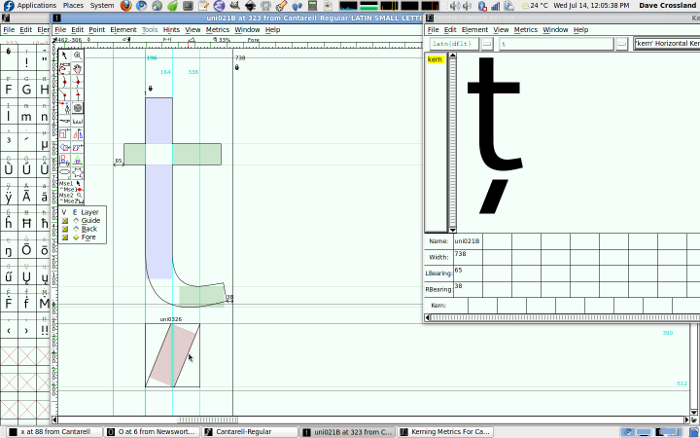
He not only replied fast, with a promise to improve the fonts and a preview of the patch (the 'regular' version of the font), he also gave me extensive advice about font editing (I expressed my lack of confidence in my font editing and hinting knowledge), including a screenshot, so I think I will share the knowledge:

cantarell
FontForge screenshot by Dave Crossland

What I did was to open the kcommaaccent glyph (U+0137) and drag a guide down to -122 and copy the comma glyph shape. Then open the combining glyph U+0326 and paste it in, making it center-aligned on the origin (so the metrics are both -169). Then select the 4 accent glyphs you list, and at the element menu, Build, Build accented glyph.

...and make sure they are vertically aligned with the guide I just made, and "by eye" check they are horizontally aligned with the bulk of the black of the letter. See screenshot attached."

Thanks Dave, you are awesome! - that's an "upstream" pleasant to work with.

08 July 2010

GIMP 2.7.x

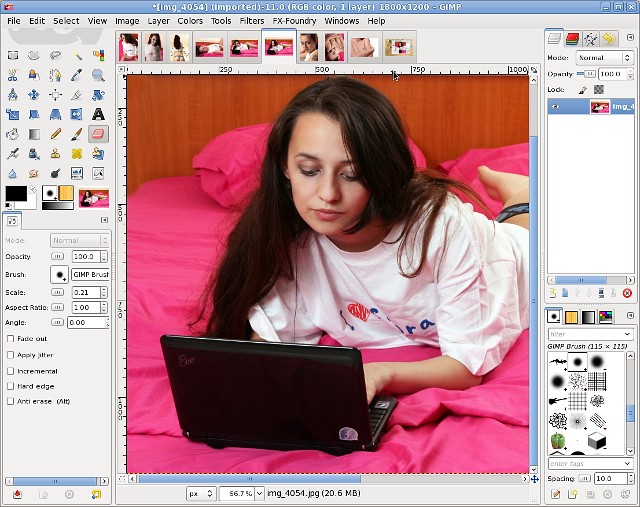
Thanks to Luya (and the people who helped him in turn) there is a GIMP 2.7.x package (the development trunk, leading to the much awaited 2.8) available in koji, I was busy these days and almost forgot about it but the GIMP scammer this morning reminded me about it, so I had the opportunity to play:

gimp 2.7.1

For starters I tried the single-window mode, which everyone seems to anticipate so badly and forced myself to use it for a while: I am not sure I will end using it as default, I feel it wasted some screen estate, probably is not usable on the netbook. There are also some smaller interface changes you have to accommodate with, like the move from Save to Export dialog of a lot of file formats, zoom shortcuts and more.

Scammers

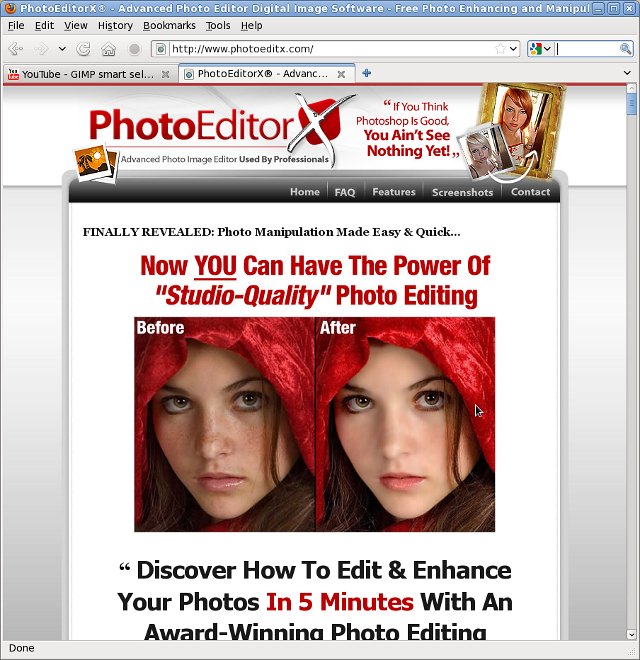
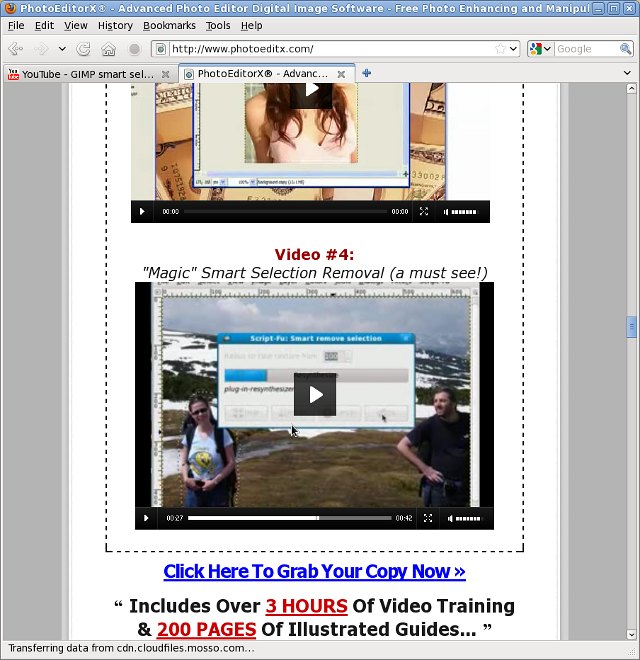
We all know those scammers who take FLOSS software, change the name and try to make a buck from naive users, I saw this so many times with OpenOffice.org, GIMP, Inkscape, Audacity and so on. So no surprise seeing one of those renaming GIMP as PhotoEditorX, hyping is as "Award-Winning Photo Editing Software Previously Only Available For Professional Studios" or "Dead-Simple To Get Started & Great For Beginners & Professionals Alike" (GIMP detractors - that is in your face!) and selling it as the incredible discount of 47$ (down from $297)

scam

Nothing out of usual so far until the step where a kind soul noticed the scammer is using one of my videos to advertise his product (a small demo for the Resynthesizer smart-removal plugin. I am not very sure if I should be angry about such usage (at least I have a title in the video saying "GIMP") or feel flattered by my video being called "a must see!". Anyway, the video is Free, licensed as CC-BY-SA, so the only thing I could do is to try to get satisfaction on the BY (attribution) and SA (share alike) parts (like a scammer would care!). Or try to shame him on my blog... oh, I just did that :D
scam

So a moral for this story? That's what the guy has to say about GIMP "If You Think PhotoShop Is Good, You Ain't See Nothing Yet..." Ignore the hype, have a look at my Free graphics tutorials and you will understand applications like GIMP and Inkscape are really useful, with the potential to make your life better. Just don't give money to scammers.

05 July 2010

3G woes: maybe NetworkManager isn't that bad?

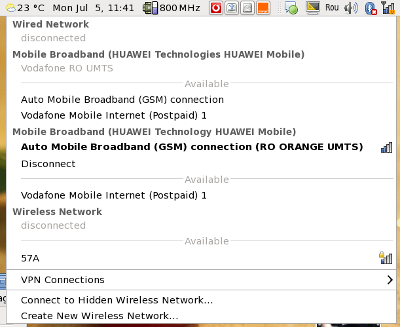
I curse NetworkManager a lot, these days my main internet connection at home is 3G, using a Huawei E160 modem, an Orange 3G subscription, Fedora 13 and an EeePC (a match made in heaven, yeah, right) and the combination works painfully bad, not sure why, due to the service provider, the cheap modem or NetworkManager but from what I remember it works worse than used to in Fedora 12, which made me sometime think about downgrading (or jumping to F14 as soon as the Alpha appears, but that would mean inflicting GNOME 3 earlier... uh, no good solution on the horizon).

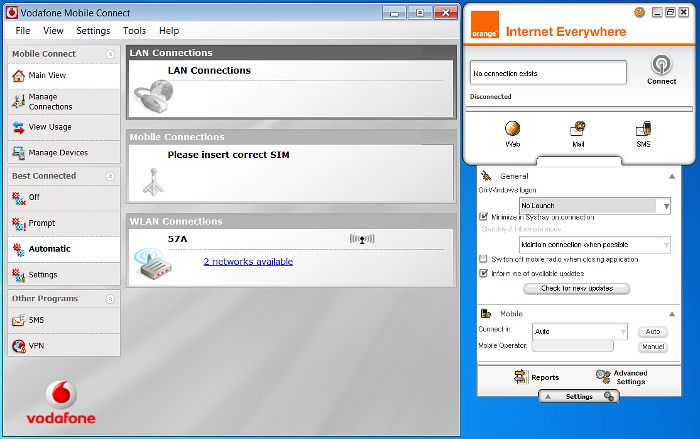
Well... it looks like my cursing should slow down after I had to deal at work with a much worse situation: Windows 7 on a Sony Vaio netbook, the same Huawei E160 on Orange and a Huawei E220 on Vodafone. Have a peek:

3g
Windows monstrosity

I won't talk here about the awful user interfaces (supplied by the carriers and you must use them) which make your eyes hurt, brain explode and usability die (compared with them NetworkManager is a breeze). My problem here is with making them both work together on the same computer, which on Linux is natural: you add the connections in NM (with a wizard) and just select whatever you want from a menu.
3g
Linux: nice, clean and both working simultaneously

My task here was investigating the quality of the Vodafone solution, try the Orange one and evaluate which is better, so the computer already had installed Vodafone Mobile Connect and the E220 drivers. In this situation Orange Internet Everywhere (you must love those names!) refuses to install itself, it supposedly installs (automatically) some drivers and then reports and this is all, it says then you already have the the latest version. Installing the application manually, it doesn't see any connection. The two apps just refuse to stay installed both at the same time and uninstalling is not easy either (last time when I had to remove the Vodafone app and make the Orange one work I had to do a system rollback to get rid of everything).

Needless to say, the modems are carrier locked (you can't buy unlocked ones) so you can't switch SIM cards and no apps work with the SIM from the other carrier. And no independent application is available from the hardware manufacturer (Huawei). And putting Linux on that netbook is not an option either.

I said you already how much I hate 3G?

04 July 2010

Good hackergotchis for everyone

A good Planet blog aggregator, like our Planet Fedora is defined by its great content, and I am one of those who strongly believes great content is not only dry info about our work and press releases, but also personal things about the people lives: data about our pets, year long running self-portraits, game tips, movie reviews, mosaic covered drawings and so on (I may not be 100% on the same page with the board here, but I am a known felon). But the content by itself is just content and is provided by a large and distributed team, we at the Design Team can't, and should not try to influence it, what we can do is to improve the presentation.

Presentation-wise, we have a nice template that fits the look and feel of Fedora and we have those little graphics named "hackergotchi" which are ...not perfect. So that's the purpose of this article: talk about them, give a few hints about how they can be improved and show some examples.

A dry definition from Wikipedia sounds like this: "A hackergotchi is a picture of a writer used as an avatar to identify the author of a given web feed in blog aggregators" and also according to Wikipedia they were somewhat invented by Jimmac (BTW, I am still speechless in awe by the news about him joining Red Hat maybe is still hope for GNOME 3 to not become a turd?). In practice they are disembodied hacker heads floating next to one's blog post, to help identify and make a personal connection with the author.

Years ago I tried to improve their state and did what I was able to do: created a default icon for those who do not have an image, wrote a small tutorial about creating your own hackergotchi and created a wiki page where those who can to it themselves can place a request. I advertised those on Planet, but failed to do the next step: proactively contact people with bad, poor or unsuitable hackergotchis and inform them about their options. I suck.

Now I passed the hackergotchi maintenance torch to Pierros who, as a junior member of the Design Team needed an entry task so I can pretend to have an eldery status and make judgements on quality and pass advices. And be self pretentious.

From a technical point of view a hackergotchi is a small PNG image with transparent background, so it can work regardless of the page background, usually depicting the head of the person with no background and having a drop-shadow to make it stand-out better in the page. Historically I used to make them 96x96 pixels, people who did themselves used whatever sizes they thought of but recently Pierros proposed, and we agreed, to move to a new standard size, 120x120, which should be small enough to not alter the layout but large enough to give a better image, so you can actually recognize the person when meeting face to face. Also, when cutting your face on the contour, leave out your neck or body.

From an artistic/photographic point of view you need a good photo: as the image is supposed to represent you, it must show your personality, so don't use photos like they are used for your passport/id card/driver license, use something to show your soul. Try to take the photo with a good camera, using the crappy one made with your cell phone may be usable if you have the perfect light, get a lucky angle and the stars are aligned, but most of the time not even the most experienced GIMP wizard will have a hard time with it and the result will not be great. When taking the photo is a good idea to use a plain, seamless background so the work is easier and if your hair is curly, fluffy or long to have it hung together (you know how hard is to cut the hair's contour?).

If I scared you with the instructions above, here is the sugar-coating: we have a service where the Design Team will do the work for you if you provide an image! Go to our ticketing system and put a new request, select "hackergotchi request" as the type at the top of the ticket and attach or link to a photo (please, see above what is a good photo).

At the latest IRC meeting, when I was tasked with this article we considered a good addition would be a list of examples of good hackergotchis, but as the creator of many of those images I wanted to avoid bias, so Mo helped me with a list with what she consider good samples (I don't necessarily agree with her selection), which I will try to comment and highlight the strong points, so here we go:

hackergotchi for this one I do like the shooting angle, is good and it made the cutting work easier and I like his smile, however, I don't like his eyes being so closed, I don't believe this is his personality (IIRC, it was a beach photo and the sun was "guilty" for that).

hackergotchi this one is great and it was made by the user himself: the photo is very sharp, made probably with a good camera, the smile is telling a lot and the hat used to tell its part of the story.

hackergotchi warm smile, good angle = good hackergotchi

hackergotchi here you can see the result of using a good camera, however not knowing him in person can't say how representative the smile is. I acknowledge my GIMP'ing mistake, should have cleared a bit more below the ear.

hackergotchi very sharp image, easy to work with and a huge smile, showing a person you would want to work with too.

hackergotchi good original angle, good GIMP work for cutting, it could have used a bit more sharpening

hackergotchi this one also suffers IMO from the lack of sharpness, maybe GIMP can help, otherwise is great: the angle, the posture, the diffused light.

hackergotchi another warm smile, another hackergotchi made "by the book".

hackergotchi this one is close to perfection: good photography (sharpness, light), good posture, big smile. Only a few pixels at the chin could have been softer (why do you think we use drop shadows? to make those pixels less visible!)

hackergotchi I would have not included this one as a "good" example: it to flat, the camera used was not great (look at the hair) and the background is white, not transparent. But he has a good smile, which makes a lot.

hackergotchi great one, the angle tells a whole story, that's someone you don't want to miss with.

hackergotchi if you know Pierros, you know his smile. Still, I had a lot of troubles with this, his black hair is held with a black band and it was really hard when GIMP'ing to understand which is which.
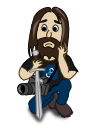
A closing conclusion? Yeah, is the time, I feel like I already bored everyone: rules? yes, they are usually good, but when you have a vision, forget about them, go crazy and show the real you. And take all I said with a grain of salt, after all I am the one using currently as hackergotchi the drawing below:
hackergotchi

Update: Jef just provided a template small howto for adding badges to your hackergotchi, adding the link as it is an useful reference.